Fortnite friends, chat and unwanted contact
Work out who can join and talk to your child in Fortnite, with practical help for unexpected guests, unkind classmates, blocking and reporting.
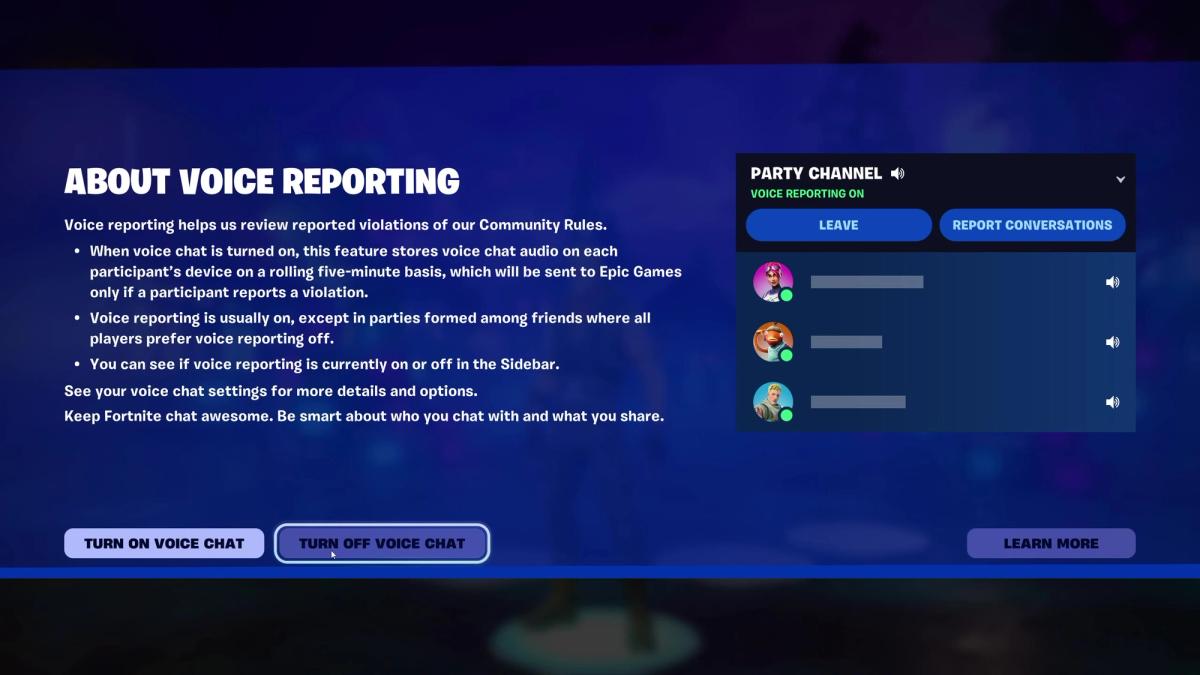
Playing against unfamiliar people doesn’t have to mean talking to them. Check voice and text permissions separately. If someone is upsetting your child, help them leave first; the settings can wait.
- What to do now
- Look through the Epic and console friend lists together, check both chat settings and practise leaving a party.
- Settings that matter
- Voice and text chat; Epic and console friends; who can join the party; any separate phone or console conversation.
On this page
- Four words that explain who is there
- Choose the conversation, not just the company
- What Invite Only does, and what it does not
- Situation one: somebody’s friend joins unexpectedly
- Situation two: a classmate is being cruel
- Reporting without making your child stay
- Practise the exit before it is needed
- Questions
Your child can play against unfamiliar people while keeping conversations with them off. Playing in the same game, appearing on a friend list and being allowed to talk are separate things. You can choose who may speak or type to your child, then agree on what they can do if somebody unwanted joins.
If someone is upsetting your child right now, help them leave the conversation or game first. The settings can wait. They don’t need to stay to be polite, finish the round or collect evidence.
My 25 October 2026 PC recording covers adult onboarding and solo Battle Royale. I saw the voice-reporting explanation, but did not test a conversation, a child’s chat permissions or an unwanted party arrival. The practical routes below come from Epic’s current guidance.
Four words that explain who is there
A party is a group that gathers to talk or play together. A match is a particular round of a game. A team is the group playing on the same side within that game. A friend is an account accepted onto a friend list, whether or not anyone in your family knows the person offline.
This is where the labels can get confusing. Two school friends might join together and then be given extra teammates. Someone in their party might invite a person neither of you knows. And even a friend you’ve approved can have an unkind moment.
A party can also stay together across supported Epic apps. Leaving a match may leave the conversation running, so check that your child has left the party too. Epic explains how this works across its services.
Choose the conversation, not just the company
Voice chat is spoken conversation through a microphone. Text chat is written conversation. Review both in the child’s parental controls.
Friends Only includes Epic friends and platform friends, such as the console’s friend list. Friends, Team Members, and Connections is broader: it can include assigned teammates and people connected through friends. Nobody, or Off in the in-game communication settings, turns off microphone voice or freely typed chat, according to the permission you are changing. Standard preset phrases can still be available in games that support them. The current communication guide describes these options.
If you’re still working out who’s on the friend lists, you can keep conversation off while you look through them together. If talking to known friends is the point of playing, check those accounts before choosing Friends Only. Adding an unfamiliar person as a friend would also let them through that restriction.
One simple question is worth asking: “How are you talking to each other?” Your child might use the console’s group chat or a phone app alongside Fortnite. Those have their own settings, so a change in Fortnite won’t necessarily end the conversation.
What Invite Only does, and what it does not
Invite Only means someone needs an invitation or an approved request to join. It’s useful, but other party members can invite their friends too. If your child joins somebody else’s party, that person’s joining rules apply while they’re there.
The practical family rule can be: “If someone new arrives, check who they are before continuing. You can leave and invite your friend into a new group.” This is especially useful when your child knows one friend well but does not know everyone that friend plays with. Epic’s party FAQ explains invitations and party ownership.
Situation one: somebody’s friend joins unexpectedly
Say your child invited a school friend, then an account appears that nobody at home recognises. You don’t yet know anything about that person. You do know that the group is different from the one you agreed on.
Your child can leave or silence the conversation while you check. Ask the known friend who joined through a way you already trust. There’s no need to ask the unfamiliar player for personal information to prove who they are.
If the family agreement was “only the two of you,” start again with that boundary: “We’re keeping this session to people we already agreed on.” The child does not have to argue about the newcomer’s character. If the group will not respect the boundary, choose a different activity or group for that session.
Afterwards, look at the friend lists and chat permissions together. A broader chat choice may have allowed someone who wasn’t a direct friend to speak. Knowing which setting allowed that will help you decide what to change.
Situation two: a classmate is being cruel
Knowing the child offline doesn’t make an upsetting conversation easier. In one Reddit discussion, a parent described a class bully joining shared games despite attempts to block contact. The thread shows the problem another parent was facing, but doesn’t establish a fix that worked. You can read their account here.
Help your child leave first. Then distinguish the available actions:
- Mute stops one person’s voice reaching your child. Deafen silences incoming party voice more broadly.
- Block cuts the account connection and communication. It does not remove either player from an existing party.
- Kick removes a person from the party, but only the party leader can do it. Leave lets your child remove themselves.
- Report sends the conduct to Epic for review. It is a separate action from blocking.
Epic’s party tools explain these options. The distinction to keep in mind is that blocking cuts contact; it doesn’t guarantee the two children can never appear in a shared game.
If this is also happening at school, you can speak to the school as well as reporting it to Epic. Keep a simple account of what was said or done, the account name, roughly when it happened and whether it happens offline too. You can ask for help without posting screenshots or identifying either child publicly.
Reporting without making your child stay
Help your child leave an upsetting conversation first. If you choose to report it, select the player or chat reporting option and the reason that fits. Voice evidence has a time limit, so it helps to know the reporting route before it is needed. There may not be an immediate response; leaving or blocking contact is a separate decision.
When I read Fortnite’s voice-reporting notice, I wondered whether a comment from 20 minutes earlier would still be available. Epic says the system keeps only the latest five minutes of voice audio on the player’s device. New audio replaces older audio. Submitting a voice report sends that recent clip to Epic; it does not recover an earlier part of the session.
You can still report a player, mute them or block them when there is no eligible audio to attach. Voice reporting is always on in conversations that include under-18 players. A child does not need to stay in an upsetting conversation to collect evidence. Epic’s voice-reporting FAQ explains the buffer and the available choices.
Epic’s party reporting instructions show the available routes. Before sending, check that you’ve selected the right account. If your child isn’t sure which person it was, take a moment to clarify rather than guessing.
Practise the exit before it is needed
During an ordinary, calm session, ask your child to show you how to leave a party and where the player options are. If you want to check an invitation or restriction, another adult you know can help with their account. There’s no need to involve strangers to test it.
Agree on wording they can use: “I’m leaving this chat. I’ll talk to you tomorrow.” They do not owe the group a long explanation. At home, make the response predictable too: “Thank you for telling me. Let’s sort out what happened.”
Before the next session, have your child show you their way out and agree on what happens when somebody new joins. Revisit that plan when the people or apps they use change.
Questions parents ask
Does blocking someone remove them from a party?
No. Blocking cuts contact, but it doesn’t remove either player from a party they’re already in. The party leader can remove someone, or your child can leave.
Does Invite Only mean I approve everyone who joins?
No. Other party members can invite their friends too. If your child joins someone else’s party, that party’s joining rules apply. Agree on what your child can do when someone unexpected arrives.
Can I report something said more than five minutes ago?
You can still report the player, but the voice buffer only holds the latest five minutes. Older audio is replaced as new audio arrives. Your child can leave an upsetting conversation first; they do not need to stay to collect evidence.
What this guide is built on
- websiteCover screenshot: Shannon / MPC, 25 October 2026Cover: voice-reporting notice in Shannon's adult PC setup, 25 October 2026 at 03:15. Screenshot: Shannon / MPC. This does not establish a child's default or the final saved setting.