Playing Fortnite with your child when you barely remember how
Try a first Fortnite session together with the devices you already have. Find the right account setup, choose one activity and let your child show you around.
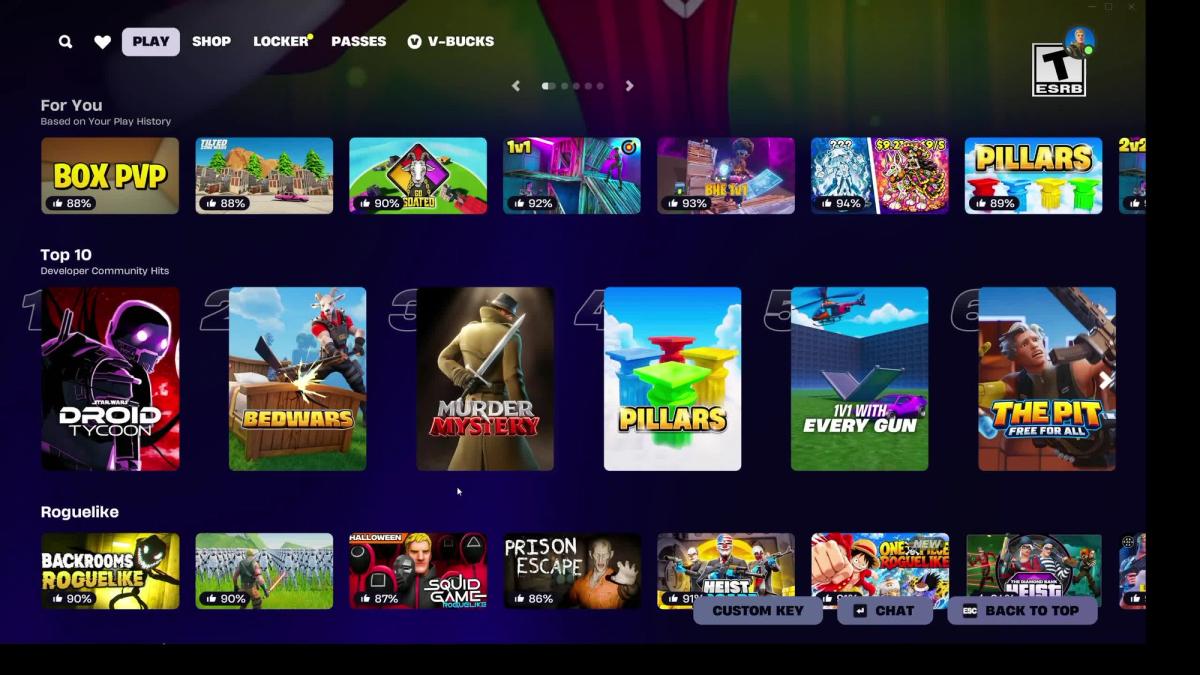
Choose one approved game, check your devices and accounts, and agree on a finish time. My solo Windows PC session informs the beginner advice; joining another player and sharing a screen still need a hands-on test.
- What to do now
- Check whether your chosen game supports two people on one screen, or whether you’ll each need a device.
- Settings that matter
- Invitations to the right account; who can join; team size and whether the game adds teammates; chat permissions.
On this page
You can join your child without buying a special outfit or getting good at Fortnite first. Start with the devices you have and a small goal: get into the same game, let them show you something they enjoy, and finish together.
I have now tried two solo Battle Royale matches on Windows PC, recorded on 25 October 2026. I haven’t yet tested joining another player, playing on two devices or sharing one screen. Those setup steps still follow Epic’s instructions. My solo session does give me a clearer picture of the controls a new adult player may be trying to learn.
Can you use one console and one screen?
Sometimes, yes. On PlayStation and Xbox, selected games support local multiplayer, which means two people using one console and screen. Epic’s current list includes Battle Royale, Zero Build, LEGO Fortnite Odyssey and LEGO Fortnite Brick Life. Look for the Local Players tag in the game’s details when setting up the second player. This option isn’t supported on Nintendo Switch, mobile or PC, and it isn’t available in every game mode.
For that setup, you need two controllers, two supported console accounts linked to Epic accounts, and an internet connection. Guest and Quick Play accounts won’t work for the second player. Epic’s instructions start in the lobby, the waiting screen before a game. Connect the second controller, select the second console account and follow its Epic account-linking prompt. The second player should then appear. The current instructions also include troubleshooting.
If you can, sort this out before the time you’ve promised to play. Finding an old password can easily take up the whole session. If you can’t find the Local Players tag, try another supported game or the two-device route below. Buying a second controller won’t add the feature to a game that doesn’t support it.
What if you have two devices?
Each person needs their own Epic account and a device or service that can run Fortnite. Playing across different device types is called cross-play. If you can’t join from different devices, check your child’s console permissions as well as Fortnite’s settings.
Use your child’s existing account so their progress and permissions stay together. If you’re returning after years away, recover your own account for playing alongside them. Fortnite’s official help centre is the place to check installation options for your device and region before buying equipment or another service.
You don’t need a paid reward pass, a monthly Crew membership or an outfit for your character to enter Battle Royale, Zero Build, Odyssey or Brick Life. If you use a cloud-gaming service, which streams the game to your device over the internet, check that service’s own access conditions.
Choose the activity before inviting anyone
Ask your child to show you the full title and explain what you’ll do together. Start with a game you’ve already agreed to. A competitive shooting round and a LEGO building session can both be called “Fortnite,” but they make for quite different first evenings.
If your family has decided to try Battle Royale, Zero Build removes the building part, according to Epic’s description. That gives you one less system to learn, but it still involves shooting and competition. My recording used Build, Solo, not Zero Build. Check the rating and content description shown for the exact game you select; leaving out building does not make it a younger-age version. ESRB’s Fortnite guide explains how the individual game ratings work.
If the activity doesn’t end in rounds, agree on one small goal, such as making an item or finding a place, and a time to finish. You can leave an unfinished goal for another session. Otherwise “we’ll stop when we’ve made it” can grow into a much longer evening.
Get into the same group
- Open Fortnite on both accounts. Confirm the display names so you do not send a request to a similar-looking stranger.
- If you are not connected already, use Add Friends to search for the other person’s Epic display name, send a request and accept it on the second account. Keep the parental PIN restriction in place and approve this known connection. Epic’s friend-adding instructions show the route.
- Select the known account in the friends list and invite it to your party, the group gathering to play together. Accept on the second device. Check that both people appear in the same lobby, the waiting screen before a game. Epic’s party introduction explains invites and shared lobbies.
- Confirm the selected experience and joining options before starting. In a team-based mode, Duos means a two-player team. Fill, where offered, lets the game add players to unfilled team places; No Fill leaves those places unfilled. Match the team size to your plan and check the actual setting on screen. Some Ranked modes, which track competitive standing, restrict the Fill choice. Epic explains the Team Fill control and exceptions.
- Check communication. In the same room you can talk without enabling online voice. On separate devices elsewhere, use only the communication route you have agreed to. Do not widen the child’s permissions just to bypass a setup problem.
- Follow the displayed ready/start prompts. If either account is blocked, read the reason before entering a PIN. An age-rating restriction is a content decision, even when the other player is a parent.
If you can’t get both accounts onto the same waiting screen, check three things: are both games updated, was the friend request accepted, and do the account and console permissions allow you to join? Epic’s cross-platform help covers playing across devices. Leave the accounts linked while you work through those checks.
Let your child teach one thing at a time
“Show me how to move and look around first” gives your child a manageable teaching job. Once you can do that, ask for the next thing you need. If neither of you knows a button, look at the device’s control settings together. You don’t need to remember how it worked years ago.
In my PC session, I didn’t find a clear walkthrough before joining a match. Instructions did appear during play, including prompts for chests, healing and the safe area. I was also relying on experience with other games. Learning a button while a fight is happening is different from practising it quietly, so agree that your first goal together can simply be understanding what to do.
Make room for the part your child wants to show you too: a building they made, something they saved for or how they help a teammate. One parent on Reddit described their eight-year-old making a tutorial book for them. You can read that account here. Being new can give your child something they’re pleased to teach you.
Keep the first session’s expectations small: “I’ll need a little time to learn. Tonight I just want to try this with you.” If your child wants a more competitive game with friends afterwards, agree on that time separately.
Finish together
As the end time approaches, stop starting new matches or big tasks. In my solo PC matches, the result screen offered Return to Lobby alongside a prominent Play Again button. That is a useful place to decide to finish. I have not tested the exit sequence while playing with someone else, so read the game’s leave or return warning together. In a persistent world, a saved place you can return to later, check who owns it and how you’ll get back in before ending the visit.
Leave the party too if the conversation is meant to finish. Then you might ask, “What did you most want me to understand?” The answer can tell you something the score won’t.
Watching counts too
Watching is a perfectly useful way to take part if the equipment, controls or time make joining difficult. Sit beside your child for an agreed session. Ask them to show you the title, explain who’s there and point out any purchase or invitation that appears. One parent described doing this with their eleven-year-old. Their account offers another way in.
You can be interested in what your child enjoys without enjoying every part yourself. Before you finish, choose what to share next: another try together, a different game or a chance to watch the thing they most wanted to show you.
Questions parents ask
Can we play together on one screen?
Selected games support two people on one PlayStation or Xbox console. Check the Local Players tag and the controller and account requirements. This option isn’t supported on Nintendo Switch, PC or mobile.
Do I need to buy an outfit or pass to join my child?
No. Battle Royale, Zero Build, Odyssey and Brick Life don’t require those purchases or Crew membership. If you use a service that streams the game over the internet, check that service’s access conditions too.
What this guide is built on
- websiteCover screenshot: Shannon / MPC, 25 October 2026Cover: Fortnite's game-selection menu in Shannon's adult PC session, 25 October 2026 at 10:10. Screenshot: Shannon / MPC. Browsing does not mean the listed games were tested.